


CS-Cart Orders Stuck as Incomplete After Payment
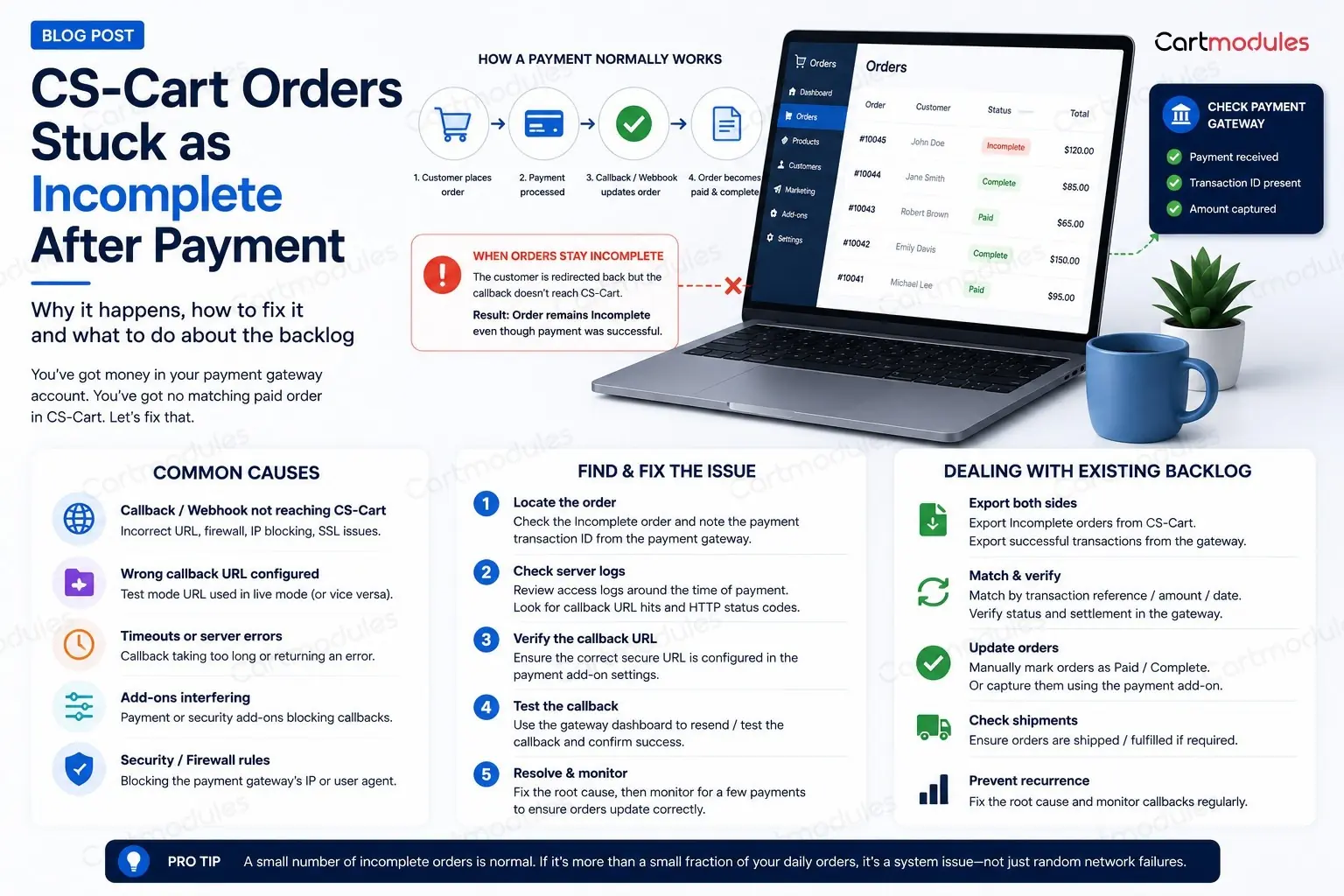
You've got money in your payment gateway account. You've got no matching paid order in CS-Cart. And you've got a customer emailing to ask where their stuff is.
If you're cross-checking a gateway dashboard against your order list by hand, this post is for you. Here's what "Incomplete" actually means, why it happens, and how to clear the backlog without shipping anything twice.
What Incomplete actually means
Worth being clear about this, because the name throws people off.
When a customer reaches checkout, CS-Cart creates the order row before sending them to the payment processor. It has to. The processor needs an order ID and an amount to work with. That order is created with the Incomplete status.
The customer then goes off to PayPal, Stripe, Tabby, whoever. They pay. And the processor is supposed to come back and tell your store what happened, in one of two ways:
- The return URL. The customer's browser is redirected back to your store with the result
- The callback (also called a webhook, or IPN in PayPal's case). The processor's own server posts the result directly to yours, behind the scenes
When one of those lands, CS-Cart moves the order to Paid, Processed, or whatever you've configured. When neither lands, the order sits at Incomplete forever.
So Incomplete doesn't mean "the customer didn't pay." It means your store was never told whether they paid. Those are very different problems, and only one of them costs you money.
The five reasons the message never arrives
In rough order of how often we see them:
1. The customer closed the tab
One of the most common, and the least worrying. They paid, saw the processor's confirmation, and closed the browser before the redirect back to your store completed.
If you rely on the return URL alone, that order stays Incomplete. If your callback is working properly, it gets updated anyway a few seconds later. This is the whole reason callbacks exist. And if a closed tab is breaking your orders, the real problem is number 2.
2. The callback URL is wrong, or was never set
Every processor needs to know where to send the notification. That's configured in one of two places, depending on the gateway: in the payment method settings inside CS-Cart, or in your account on the processor's own dashboard.
Common ways it goes wrong:
- The store moved from
httptohttpsand the callback URL still sayshttp - The store moved domain, or from a staging URL to the live one, and the callback URL didn't follow
- The store runs on
www.but the callback points at the non-www.version, or the other way round - The callback URL was never filled in at all, because the store worked fine in testing where the tester always waited for the redirect
Check this first. It's the cheapest thing to rule out.
3. Your firewall is blocking the processor
This one is nasty because everything looks correctly configured and it still doesn't work.
A payment callback is a POST request from a server you've never heard of, often from an IP range that changes, sometimes with an unusual user agent, sometimes with no user agent at all. That is a fairly good description of what a web application firewall is designed to block.
The usual culprits:
- mod_security rules rejecting the POST, often with a 403 or 406
- Cloudflare or a similar edge service challenging the request. A processor's server can't solve a JavaScript challenge, so it just fails
- A country-level IP block that happens to include the processor's servers
- Rate limiting, if you take a burst of orders
We've personally lost days to a mod_security rule that rejected any request arriving with an empty user agent. Nothing in the application logs suggested a firewall. The request never got that far.
4. The redirect strips the data
Some setups quietly mangle the callback before it arrives:
- An HTTP to HTTPS redirect that converts a POST into a GET, dropping the body
- A trailing-slash redirect doing the same thing
- A CDN or proxy in front of the store that doesn't forward POST bodies to the callback path
- A maintenance-mode or "store closed" setting that returns a 503 to everything, including the processor
Rule of thumb: the callback URL should be reachable directly, with no redirects. If typing it into a browser bounces you anywhere, the processor is getting bounced too.
5. The order genuinely wasn't paid
Sometimes Incomplete means what people assume it means. The customer got to the payment page, changed their mind, and closed it. The card was declined. The BNPL provider rejected them.
These orders should be Incomplete, and they should stay that way. Which is exactly why you can't fix this problem by bulk-marking everything as Paid.
The PayPal special case
PayPal deserves its own section because it behaves in a way that catches people out.
IPN is separate from the return URL, and it can be switched off. Check your PayPal account settings. If Instant Payment Notification is disabled, or pointing at an old URL, no amount of fixing things in CS-Cart will help.
The "Completed then cancelled" flip. PayPal can send an IPN saying Completed, and then send another one later reversing it because of a dispute, a chargeback, an eCheck that didn't clear, or the payment being flagged for review. If your store only reads the first message, you'll ship goods for money that has since gone back.
Pending is not Paid. eCheck payments, and payments held for review, come through as Pending. They may clear in a few days, or never. Treating Pending as Paid means shipping against money you don't have yet.
Sandbox and live IPNs are different endpoints. If the store was tested in sandbox and the setting didn't get switched, live payments send notifications nowhere useful.
How to work out which one you've got
Don't guess. Go and look, in this order.
Start with the order itself. Open the Incomplete order in the admin panel and check its status history and any payment data stored against it. If there's a transaction ID from the processor, the payment attempt reached the processor. Check its actual payment and settlement status there before assuming the callback is the only problem. If there's nothing at all, the customer probably never got that far.
Then go to your web server access log. This is the check that actually settles it, and it's the one people skip. Search for the callback URL path around the time of the order:
grep "your-callback-path" /var/log/nginx/access.log | tail -50
Three possible answers, and each one tells you what to do next:
- Nothing at all. The processor never sent it, or it was blocked before reaching your web server. Look at the processor's dashboard and your edge firewall
- A 403, 406 or 503. It arrived and something rejected it. That's your firewall or maintenance mode
- A 200. It arrived and your store accepted it, but didn't act on it. Now it's an application problem, and you need a developer
Check the processor's dashboard. Every serious gateway logs its notification attempts and the response it got. PayPal has an IPN history page. Stripe shows every webhook delivery and its response code. This tells you exactly what they sent and what came back, which settles most arguments in a minute.
Clearing the backlog without shipping twice
Once you know the cause, you still have a pile of orders to sort out. Be careful here. This is the step where stores lose real money.
Export both sides. Your Incomplete orders from CS-Cart, and your successful transactions from the gateway, for the same date range.
Match on the transaction reference, not the amount. Two customers ordering the same thing on the same day is normal. Matching on amount will pair the wrong ones.
Split into three piles:
- Paid at the gateway, Incomplete in the store. Real money you've received. These need updating to Paid and fulfilling
- Incomplete in the store, nothing at the gateway. Abandoned checkouts. Leave them. These are the ones to feed into an abandoned-cart email, not to chase for delivery
- Paid at the gateway, no order in the store at all. Rare, and worth investigating on its own. Usually a checkout that failed after payment
Before you mark anything Paid, check it hasn't already shipped. If your warehouse works from the gateway dashboard when the store looks wrong (and plenty do), some of those orders went out weeks ago.
Check for reversals. For each one you're about to mark as paid, confirm at the gateway that the payment is still settled and hasn't been refunded or charged back since.
Stopping it happening again
Test the callback before you go live, not just the payment. A test order in sandbox that you complete by patiently waiting for the redirect proves nothing about your callback. Complete a test payment and then close the tab immediately. If the order still updates, your callback works. If it doesn't, you've just found the bug before your customers did.
Test after every infrastructure change. New SSL certificate, domain change, moving to Cloudflare, a new firewall, a server migration, or turning maintenance mode on and off. All of these have broken working callbacks.
Allow your processor's callback traffic through the firewall. Where the provider publishes stable IP ranges, allow those. Not every provider has fixed ranges, so otherwise permit their documented callback paths. If you use mod_security, exclude the callback paths from the rule set rather than turning the whole thing off.
Set up an alert. If you have orders sitting at Incomplete for more than an hour, someone should hear about it. A store owner discovering this from a customer email is a store owner who has already lost the sale.
Watch the ratio, not the number. Some Incomplete orders are normal and healthy. Those are your abandoned checkouts. What matters is the share of them that turn out to be paid. In our experience, if that's more than a small fraction, something in the callback setup deserves investigation.
When it's a code problem
If the callback is arriving, returning a 200, and the order still isn't updating, you're past configuration and into the gateway integration itself. Usually one of:
- The callback is verifying a signature or hash against the wrong secret. Common after credentials are rotated, or after moving from sandbox to live
- The gateway add-on expects a field the processor no longer sends, because the processor updated their API
- The order status mapping is wrong, so a successful payment maps to a status that doesn't look like success
- Two callbacks arrive at once and race each other
That's a developer job. It's also the sort of thing we deal with constantly. We maintain payment gateway add-ons for CS-Cart across a lot of markets, and a broken callback is the most common reason anyone calls us about payments.
If you've worked through the checks above and the callback is landing but nothing happens, get in touch and we'll look at the integration.
One last thing: whatever you fix, fix it in staging first, and test it with a real payment you then refund. Payment code is the one part of a store where "it looked fine" isn't good enough.
Common questions
No, and it's the most expensive mistake you can make here. Some of those orders genuinely weren't paid: the customer changed their mind, or the card was declined. Marking them Paid means picking, packing and shipping goods nobody paid for. Match them against your gateway's transaction list first.
Some are completely healthy. Those are your abandoned checkouts, and every store has them. What matters is the share of Incomplete orders that turn out to have been paid at the gateway. In our experience, if that's more than a small fraction, something in your callback setup deserves investigation.
Every gateway. PayPal just makes it more visible, because IPN is a separate setting that can be switched off independently, and because PayPal can reverse a Completed notification later. The underlying cause is the same everywhere: your store was never told the result.
Check your web server access log for the callback path. If nothing appears at all, the request is being blocked before it reaches your application. Usually mod_security, a Cloudflare challenge, or a country-level IP block. A processor's server can't solve a JavaScript challenge, so it simply fails.
Complete a test payment in sandbox, then close the browser tab immediately without waiting for the redirect. If the order still updates, your callback works. If it doesn't, you've found the bug before your customers did. Repeat this after any SSL, domain, firewall or hosting change.


